
AI-Powered
Video Editing
Product
Solutions
Free Tools
Article to Video
Turn articles into MP4
Script to Voiceover
Turn text into AI audio
Transcript to Help Article
Clean docs from transcripts
Video Trimmer
Cut and trim video clips
Subtitle Creator
Generate captions from audio
Transcript Extractor
Get text from any video
Video Watermark
Add logo or text overlay
Video Cropper
Resize and crop frames
AI Video Reframer
Auto crop with subject tracking
Video to FAQ
Turn video into Q&A
Video to Help Article
Auto-generate help docs
Video to Quiz
Generate quizzes from videos
Subtitle Translator
Translate captions instantly
Background Music
Add royalty-free tracks
Thumbnail Generator
Create click-worthy thumbs
Description Generator
SEO-optimized descriptions
AI Video Trimmer
Smart cuts, auto highlights
Video Merger
Combine multiple clips
Before & After Video
Side-by-side comparisons
Coming Next Video
PiP teaser into next clip
Video Rotator
Flip or rotate footage
Speed Changer
Speed up or slow down
Format Converter
Convert between formats
Video Compressor
Shrink file size, keep quality
Video to GIF
Turn clips into animated GIFs
Video Fade In/Out
Smooth intro and outro
Video Summary
AI-powered key takeaways
Video FAQ Generator
Extract FAQs from video
Video Report Generator
Custom report from any video
Image Annotator
Mark up screenshots
Video Annotator
Shapes, arrows & text on video
Audio Extractor
Extract audio from video
Subtitle Burner
Burn captions into video
PDF to Video
Convert PDF to video
PPTX to Video
Turn slides into video
Keynote to Video
Convert Keynote to video
Presentation to Video
PDF, PPTX, or Keynote
Google Slides to Video
Turn Google Slides into video
PowerPoint to Video
Convert PPT to video
Video Lighting
Brightness, contrast & more
The AI Knowledge Platform for teams that move fast
Vidocu turns the materials you have into knowledge that people need - Product Videos, SOPs, How-To Guides, Help Articles, Training videos and more.








Trusted by 20,000+ fast-moving teams


















Every team gets a faster path from expertise to usable content
See how Vidocu fits your content workflow.
Create content and assets that drive growth and engagement
Create product videos, explainer guides, campaign assets, articles, and sales content from the knowledge your organization already has. Keep messaging consistent across channels.
- Keep product messaging consistent across every channel
- Support sales, customer success, and support with reusable assets
- Produce more campaign and product content without adding more work

From raw content to polished, production-ready assets
Upload existing materials or record directly with Vidocu. Our AI engine analyzes your content, writes the script, adds voiceover, and creates polished videos, SOPs, guides, articles, and training materials.
Upload or record
Add a video, PDF, presentation, or document, or record directly with Vidocu.
VideoPDFSlidesDocumentRecordChoose what to create
Select the polished videos, SOPs, how-to guides, articles, and training materials you need.
VideoSOPGuideArticleTrainingAI analysis & creation
Our AI engine analyzes, structures, writes, narrates, and creates every selected format.
AnalyzeStructureWriteVoiceoverCreateReview & customize
Edit the content, apply your brand, choose the tone and voice, and translate it for different audiences.
EditBrandToneVoiceTranslatePublish & share
Export, download, embed, or publish your finished content wherever your audience needs it.
ExportDownloadEmbedPublishShare



Create once.
Use it everywhere.
Your raw material

A Video, Deck, PDF, or Doc
Drag & drop files up to 2GB
Upload a single video presentation, standard PDF report, or product deck. Vidocu automatically ingests the knowledge and maps it to target templates.

Vidocu generates 8 distinct channels

Training video
Narration, captions & visuals

SOP
Step-by-step your team can follow

Help article
Ready for your help center

Presentation
Speaker-ready slides

Quick summary
The essentials in a 2-min read

Knowledge base
Searchable repository for teams

Short reel
Vertical, social-ready cut

Quiz
Check understanding
Every output stays connected to the same source, so your message stays clear and consistent across every team, channel, and audience - without starting over.
Replace multiple content tools with one AI platform
Bring scripting, voiceovers, captions, multilingual content, editing, creative tools, documentation, and training creation into one connected workflow without switching between tools.
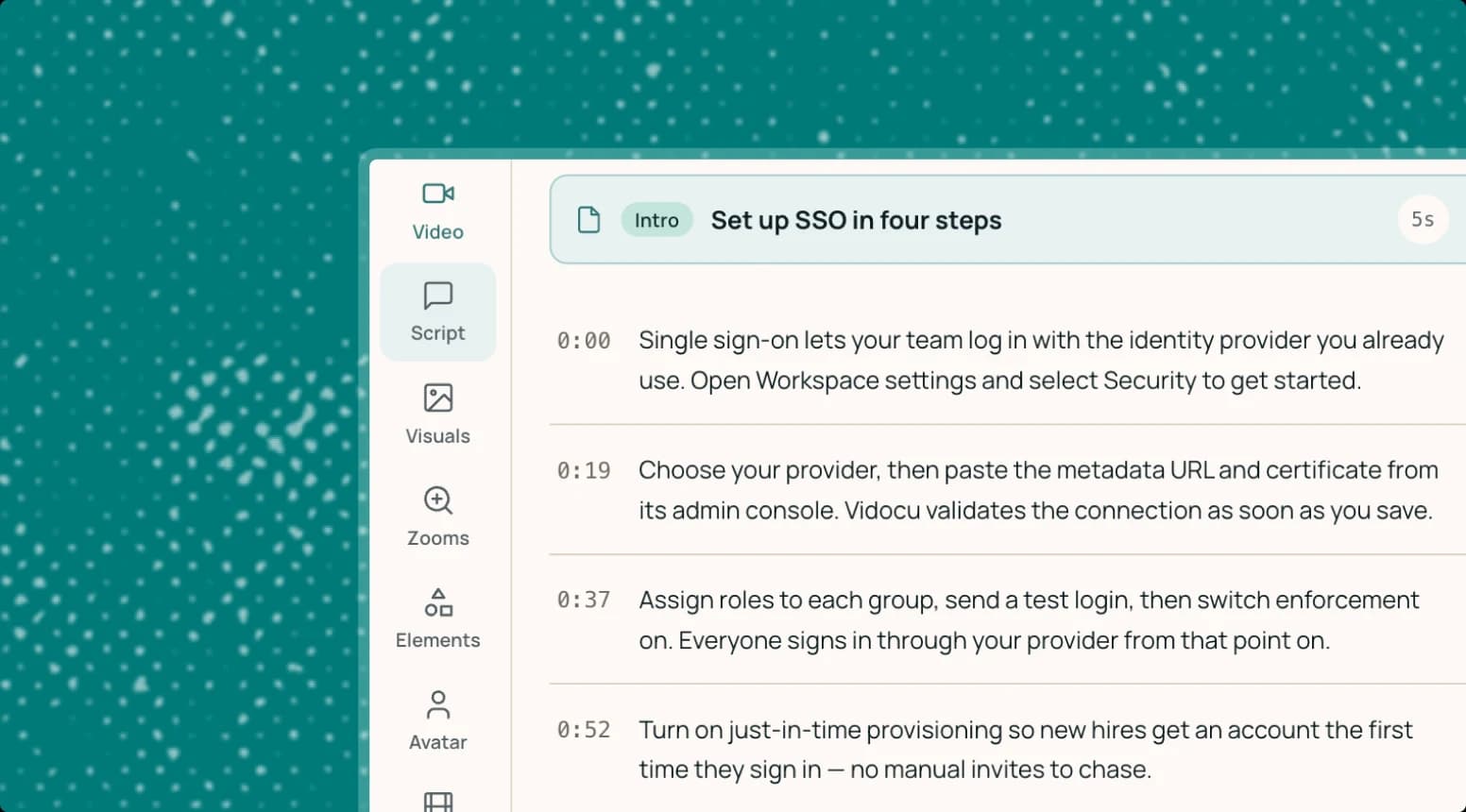
Auto Script
Analyzes your content and writes polished scripts for voiceovers, articles, and documentation.
AI Voiceovers
Create natural-sounding narration in multiple languages without recording every version yourself.

Auto Captions
Generate accurate subtitles that make videos clearer, more accessible, and easier to follow.

Multilingual Content
Automatically translate complete videos, captions, voiceovers, articles, and documentation for global teams.

Creative Tools
Add background music, annotations, AI presenters, zooms, and other finishing touches.

Auto Docs
Automatically create clear, structured articles, SOPs, how-to guides, summaries, and documentation.

Training Materials
Create learning and training content with automatically generated quizzes that reinforce knowledge.

“Unlike other tools, the learning curve is practically zero, and the cost is negligible compared to what you get and the time you save.”

I would strongly recommend it to anyone who is developing and introducing products at a fast pace. It gives you first-class how-to's and onboarding experience for early adopters, which greatly improves your chances of growing the new product.
Go beyond AI content generation
Explore the advanced tools built into Vidocu, from professional video editing and AI-powered recording to searchable knowledge bases and practical tools for everyday content work.
Advanced post-production, built into your workflow
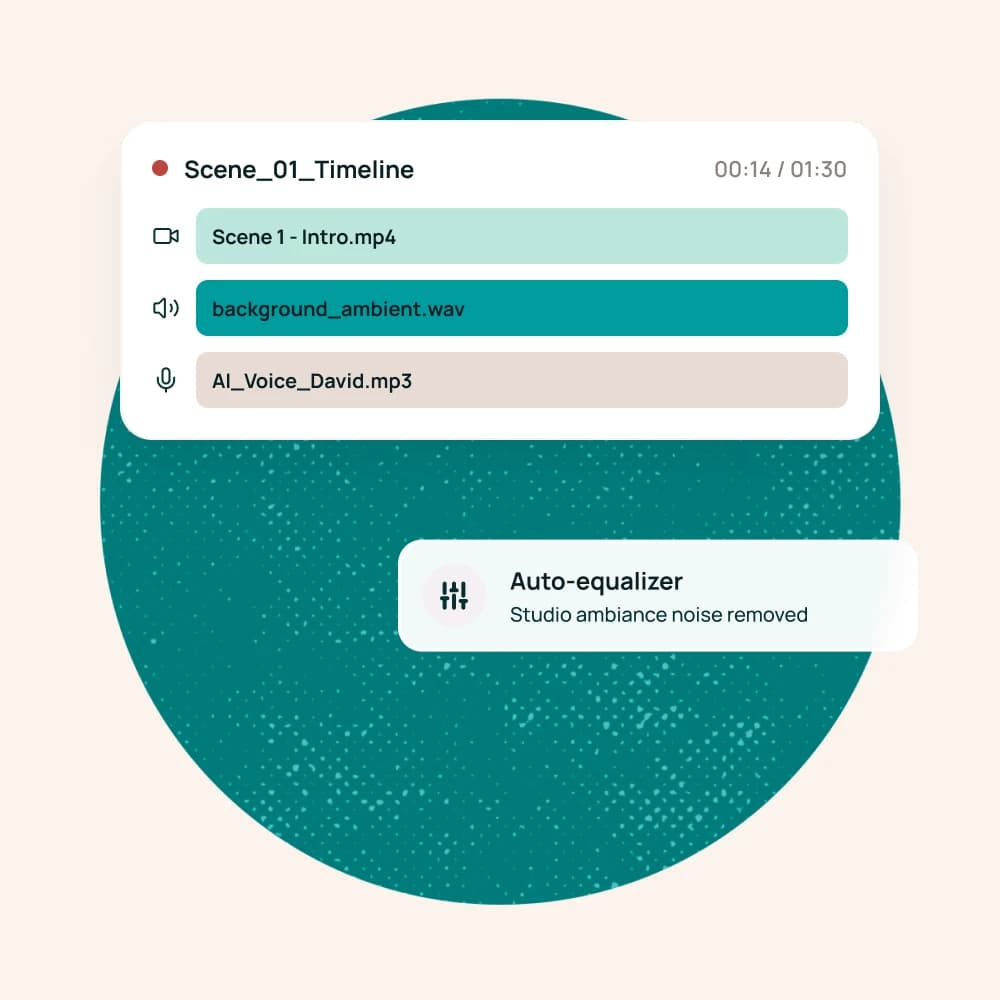
Take AI-generated videos further with a full multi-track editor for precise post-production. Arrange scenes, refine timing, mix audio, add visual layers, and polish every detail without moving your project between tools.
Build a searchable knowledge base
Publish videos, articles, SOPs, and guides in one branded, organized multilingual training hub.
Explore Knowledge CenterLet an AI agent record walkthroughs
Give Vidocu instructions, and the AI agent automatically opens your product, navigates, and records the flow.
Explore AI RecorderInstruction: "Go to Settings > Billing and capture the new upgrade form."
Auto-scrolling and locating UI elements...Practical tools for everyday content work
Use a growing collection of browser-based tools for quick video editing, documentation, transcription, conversion, and content repurposing - no heavy software to install.

Built for teams that create together
Bring people, projects, and content together in one shared workspace. Collaborate with your team, manage access by role, and keep every asset organized by workspace and project.

Team collaboration
Review, edit, and manage content together from one shared platform.

Roles & permissions
Control who can create, edit, approve, publish, or manage content.

Workspaces & projects
Organize content by team, client, department, campaign, or initiative.


Connect Vidocu to your tools and AI workflows
Use the Vidocu API to automate content workflows, and connect compatible AI assistants and agents through MCP.
API - Automate content creation at scale
Connect Vidocu to your products and internal systems to create, manage, and publish content programmatically. Deploy custom templates with variable data nodes automatically.
MCP - Bring Vidocu into your AI workflows
Let compatible AI assistants and agents securely access Vidocu capabilities from the tools where your team already works. Supports Anthropic, OpenAI, and custom LLM runtimes.

More content. Less production work.
0+
Languages for videos, voiceovers, and docs
0+
Formats created from the same source
<0min
From upload to a first editable draft
0%
Automated first draft, editable everything
Save hours, reduce repetitive work, create more formats, and localize content for global audiences.
Your content stays private and protected.
Protect your content and data with independently audited controls, secure access, and enterprise-grade privacy practices across every workspace and project.
Visit our trust center
SOC 2® examined
Controls independently examined against the AICPA Trust Services Criteria for security, availability, and confidentiality.

GDPR compliant
Personal data collected, processed, and protected under the EU GDPR, with full export and deletion on request.

Encrypted by default
Data encrypted in transit and at rest. Uploads stay private to your workspace and are never used to train AI models.
Frequently asked questions about Vidocu
Learn how Vidocu uses AI to create videos, SOPs, documentation, training materials, articles, and multilingual content from the materials you already have.
Vidocu is an AI knowledge platform that helps organizations create polished videos, SOPs, how-to guides, articles, documentation, and training materials. It combines content analysis, scripting, voiceovers, captions, editing, translation, and documentation in one connected workflow.
Upload existing materials or record directly with Vidocu, then choose what you want to create. Vidocu analyzes and structures the information, writes the content, adds voiceover and captions, and generates ready-to-edit videos, SOPs, guides, articles, and training materials.
Vidocu can create product demo videos, employee training videos, standard operating procedures, how-to guides, help center articles, product documentation, summaries, onboarding materials, and automatically generated quizzes. Multiple formats can be created from the same source material.
Yes. Vidocu works as an AI SOP generator and video-to-SOP generator. It analyzes a video or screen recording, identifies the process steps, and creates clear standard operating procedure documentation that can be reviewed, edited, branded, and shared.
Yes. Vidocu is an AI product demo video generator for creating polished product walkthroughs, feature explainers, sales demos, and product marketing videos. It can add a structured script, AI voiceover, captions, zooms, annotations, background music, and other creative elements.
Yes. Vidocu is an AI training video generator that helps create employee training videos, onboarding guides, learning materials, and knowledge-check quizzes. Training content can be updated, reused, and translated for different roles, locations, and languages.
Yes. Vidocu analyzes the source material and automatically creates quizzes that reinforce key ideas and check understanding. These quizzes can support employee training, onboarding, customer education, and other learning programs.
Yes. Vidocu analyzes your materials and creates structured articles, SOP documentation, how-to guides, help center content, summaries, and internal documentation. This makes Vidocu an AI process documentation tool as well as an AI article and help article generator.
Yes. Vidocu automatically translates complete videos, scripts, captions, voiceovers, articles, and documentation into multiple languages. Organizations can use Vidocu as a multilingual video generator and multilingual training content platform for global audiences.
Yes. Vidocu is built for collaborative content creation. Teams can work in shared workspaces, organize content by project, and use roles and permissions to control who can create, edit, approve, publish, or manage content.
Vidocu can work with videos, screen recordings, presentations, PDFs, documents, and content recorded directly in the platform. The AI engine analyzes the source material and uses it to create the selected content formats.
Vidocu uses enterprise-grade privacy practices to protect videos, documents, recordings, projects, and organizational data throughout the content workflow. Access can be managed through workspaces, roles, and permissions.
Your knowledge is valuable. Make it usable.
Upload once. Use everywhere - no gimmicks, no credit card.
Your knowledge is valuable. Make it usable.
Upload once. Use everywhere.
The AI Knowledge Platform. One upload becomes videos, SOPs, guides, articles, and training - in any language.
© 2026 Vidocu. All rights reserved.