
AI-Powered
Video Editing
Training
Product
Solutions
Help Article Generator
Help-center ready articles
AI Knowledge Base Generator
Generate content & structure
AI Video Documentation
Video + docs + localization
Video to Blog Post
Repurpose tutorial videos
SOP Template
Free template, or let AI write it
User Manual Generator
Manuals from screen recordings
Work Instructions
Visual steps from one recording
Integrations
Free Tools
Video Intro Maker
Animate your logo into an intro
Article to Video
Turn articles into MP4
Script to Voiceover
Turn text into AI audio
Transcript to Help Article
Clean docs from transcripts
Video Trimmer
Cut and trim video clips
Subtitle Creator
Generate captions from audio
Transcript Extractor
Get text from any video
Video Watermark
Add logo or text overlay
Video Cropper
Resize and crop frames
AI Video Reframer
Auto crop with subject tracking
Video to FAQ
Turn video into Q&A
Video to Help Article
Auto-generate help docs
Video to Quiz
Generate quizzes from videos
Subtitle Translator
Translate captions instantly
Background Music
Add royalty-free tracks
Thumbnail Generator
Create click-worthy thumbs
Description Generator
SEO-optimized descriptions
AI Video Trimmer
Smart cuts, auto highlights
Video Merger
Combine multiple clips
Before & After Video
Side-by-side comparisons
Coming Next Video
PiP teaser into next clip
Video Rotator
Flip or rotate footage
Speed Changer
Speed up or slow down
Format Converter
Convert between formats
Video Compressor
Shrink file size, keep quality
Video to GIF
Turn clips into animated GIFs
Video Fade In/Out
Smooth intro and outro
Video Summary
AI-powered key takeaways
Video FAQ Generator
Extract FAQs from video
Video Report Generator
Custom report from any video
Image Annotator
Mark up screenshots
Video Annotator
Shapes, arrows & text on video
Audio Extractor
Extract audio from video
Audio Cleanup
Remove noise, level volume
Audio File Cleanup
Clean up an MP3 or WAV
Subtitle Burner
Burn captions into video
PDF to Video
Convert PDF to video
PowerPoint to Video
Convert PPT & PPTX to video
Keynote to Video
Convert Keynote to video
Presentation to Video
PDF, PPTX, or Keynote
Google Slides to Video
Turn Google Slides into video
Video Lighting
Brightness, contrast & more
Post-production. In your browser.
A multi-track video editor built for professionals who need to trim, combine, annotate, and polish, without the bloat of desktop software. AI-assisted editing included.
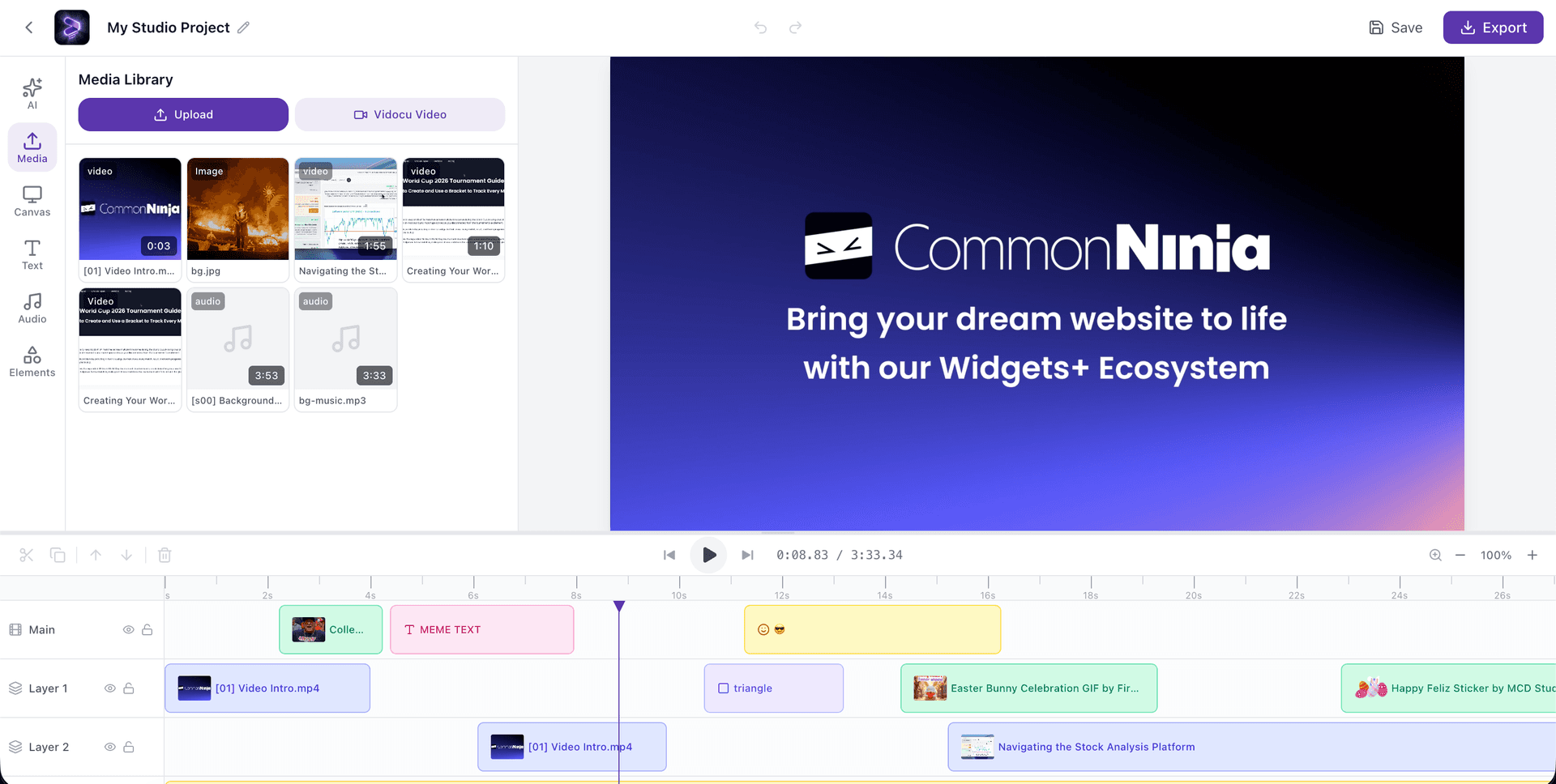
How It Works
Upload your media
Import videos, images, audio, and GIFs. Or pull existing videos from your Vidocu library.
Arrange on the timeline
Drag clips onto multi-track timeline. Trim, split, concatenate, and reorder with snap-to-edge precision.
Add effects and layers
Drop in text, shapes, GIFs, annotations, transitions, filters, and background music. Or let AI handle it.
Export in high quality
Render via cloud. Get a polished video ready for YouTube, socials, or internal distribution.
Upload your media
Import videos, images, audio, and GIFs. Or pull existing videos from your Vidocu library.
Arrange on the timeline
Drag clips onto multi-track timeline. Trim, split, concatenate, and reorder with snap-to-edge precision.
Add effects and layers
Drop in text, shapes, GIFs, annotations, transitions, filters, and background music. Or let AI handle it.
Export in high quality
Render via cloud. Get a polished video ready for YouTube, socials, or internal distribution.
Everything You Need for Post-Production
Professional editing tools without the learning curve of Premiere or DaVinci.
Trimming & Splitting
Cut clips with frame-level precision. Split at playhead, trim edges, adjust in/out points. No re-encoding on the timeline.
Concatenation
Drag multiple clips onto the timeline and combine them into a single output. Seamless joins with optional transitions.
Multi-Track Editing
Separate tracks for video, overlays, and audio. Layer content, lock tracks, control visibility and volume per track.
GIFs, Emojis & Shapes
Search Giphy for GIFs, pick from 30+ emojis, drop in rectangles, circles, arrows, speech bubbles, and blur shapes.
Text & Annotations
15+ text presets, Google Fonts, custom colors and sizing. Add titles, callouts, and labels with timed visibility.
Filters & Color Grading
16 filter presets, Vivid, Cinema, Noir, Vintage, and more. Fine-tune brightness, contrast, saturation, hue, and blur.
Transitions
Fade, slide, scale, and blur transitions between clips. Configurable duration and direction for in/out animations.
Speed Control
Slow motion at 0.25x or speed up to 3x. Timeline auto-adjusts duration. Perfect for timelapses and dramatic moments.
AI Editing Assistant
Chat with AI to edit your project. "Trim the first 5 seconds", "add a fade in", "duplicate this clip", natural language commands.
Built for Real Workflows
Every detail considered, from canvas to export.
Aspect Ratios & Canvas
Switch between 16:9, 9:16, 1:1, 4:5, and 4:3. Background gradients, custom images, padding, and border radius.
Zoom & Focus
Zoom up to 300% with adjustable focus points. Guide your viewer's eye to exactly what matters.
Transform & Crop
Rotate, flip, crop, and adjust fill/fit/PiP modes. Full control over how each clip sits on the canvas.
Audio Mixing
Per-clip and per-track volume. Fade in/out. Built-in music library with search. Upload your own audio.
Watermark
Add your logo with 9-position placement, adjustable size and opacity. Branded output, every time.
Picture-in-Picture
Overlay video on video. Position and resize freely. Perfect for facecam, screencasts, and commentary.
Who It's For
Video professionals
Post-production without desktop installs. Trim, grade, annotate, and export from anywhere. Full multi-track timeline.
Marketing teams
Repurpose one video into multiple formats. Change aspect ratio, add brand watermark, export for every platform.
Course creators & trainers
Combine lesson segments, add annotations and step markers, overlay GIFs and text. Polished training content, fast.
Product & support teams
Turn raw screen recordings into clean demos. Trim dead air, add zoom focus, annotate UI elements, export shareable videos.
Agencies
Deliver client-ready video without expensive software licenses per seat. Cloud rendering, browser access, consistent output.
Content creators
Edit shorts, reels, and TikToks in the browser. GIF overlays, trendy filters, speed ramps, and text animations.
How Vidocu Studio Compares
| Feature | Vidocu Studio | Desktop Editors (Premiere, DaVinci) |
|---|---|---|
Setup time | Open browser, start editing | Download, install, configure |
Learning curve | Minutes | Weeks to months |
AI editing assistant | ||
GIF & emoji overlays | Built-in Giphy search | Manual import |
Cloud rendering | Local CPU/GPU | |
Multi-format export (16:9, 9:16, 1:1) | One-click switch | Re-edit for each format |
AI subtitles & voiceover | Built-in | Separate tools |
Price | Included in plan | $20-55/month per seat |
Frequently Asked Questions
Yes. Studio is a multi-track timeline editor with trimming, splitting, concatenation, transitions, filters, text, shapes, GIFs, audio mixing, speed control, and AI-assisted editing. It handles the entire post-production workflow.
No. Studio runs entirely in your browser. Rendering happens in the cloud, so your local machine doesn't need a powerful GPU.
Yes. Drag multiple clips onto the timeline to concatenate them. Add transitions between clips for smooth joins. Trim each clip individually before or after combining.
The AI chat panel lets you edit your project using natural language. Say "trim the first 3 seconds", "add a fade transition", or "move this clip to the end" and the AI executes the edit for you.
Video files (MP4, MOV, WebM, etc.), images (PNG, JPG), audio files, GIFs from Giphy, text elements, shapes, and emojis. All can be layered on separate tracks.
Yes. Switch between aspect ratios, 16:9 for YouTube, 9:16 for TikTok/Reels/Shorts, 1:1 for Instagram, 4:5 for Instagram portrait, 4:3 for presentations.
16 filter presets (Vivid, Cinema, Noir, Vintage, B&W, and more), plus manual controls for brightness, contrast, saturation, hue, sepia, grayscale, and blur.
Yes. Add text with 15+ style presets, shapes (rectangles, circles, arrows, speech bubbles, stars), emojis, and GIFs. Everything is positioned on the timeline with precise timing control.
For post-production of tutorials, product demos, training videos, marketing content, and social clips, yes. Studio covers the full workflow from raw footage to polished output without the complexity of desktop NLEs.
Videos render in up to 1080p via cloud rendering (Remotion Lambda). All effects, filters, transitions, and overlays are baked into the final output.
Professional post-production. Zero installs.
Trim. Combine. Annotate. Export. All in your browser, powered by AI.
Your knowledge is valuable. Make it usable.
Upload once. Use everywhere.
The AI Knowledge Platform. One upload becomes videos, SOPs, guides, articles, and training - in any language.
© 2026 Vidocu. All rights reserved.