
Create
Voice & language
Publish & train
One upload
See how it works
One recording becomes a video, an article and a translated guide.
Edit video
Subtitles & audio
Convert to video
Write from video
Turn Your CAD Files into Manuals, 3D Guides and Videos
Upload a STEP file or any 3D model. Vidocu writes the installation, operation and maintenance manual, draws every figure from your model, and builds an interactive 3D guide of the assembly. In 80+ languages.
One 3D file. Every manual after it.
Send a 3D file- 1
- 2
- 3
- An editable manual in minutes, not months
- Every figure drawn from your model
- One manual, in every language you sell in
An agency takes three months and $5,000 per manual. Vidocu takes 15 minutes.
You already drew the product once, in CAD. An agency draws it again, by hand, for every manual and every revision.
With a documentation agency
- Week 1Brief the agency. Send drawings, the BOM, the old manual.
- Weeks 2–5They redraw every view by hand from screenshots of your model.
- Weeks 6–10Draft, mark-up, redraft. Three or four rounds of email.
- Weeks 11–12Translation, quoted and scheduled per language.
- Month 4An engineer changes a part. The figures are out of date again.
~3 months
per manual
~$5,000
per manual, before translation
With Vidocu
- Minute 0Upload the STEP file and a line about the product.
- Minute 1Review the outline: chapters, procedures, steps. Change what you like.
- Minute 15The IOM is written, every figure drawn from the model.
- ThenEdit any page in the editor. Translate in one click. Export the PDF.
- RevisionRe-import the changed file and redraw the figures it touches. Not the whole manual.
~15 minutes
from file to first full draft
~$100
per manual, every page editable
Agency time and cost are typical figures manufacturers report to us. Yours may differ.
From a STEP file to a finished IOM
- 01
Send your 3D file
STEP, IGES, STL, glTF or any of the formats below. Add a line about the product, and an old manual if you have one.
- 02
Vidocu reads the model
It finds every part, how they fit, and the order they go together. It plans the IOM chapters around them.
- 03
Get the manual and the guide
An IOM with safety, specs, installation, operation, maintenance and spare parts, plus an interactive 3D guide.
STEP is best. Almost any 3D file works.
Up to 300MB per file. Bigger? Paste a Dropbox, Google Drive or OneDrive link instead.
CAD exchange formats
- STEP / STP · The best choice. Keeps every part apart.
- IGES / IGS · Older CAD exchange format.
- BREP · OpenCascade's own format.
3D models and meshes
- STL
- 3MF
- OBJ
- PLY
- glTF / GLB
- FBX
- 3DS
- DAE (Collada)
- WRL (VRML)
Meshes work too. Keep parts as separate bodies, or the manual can't tell them apart.
Native CAD files
SolidWorks, Inventor, Creo, CATIA, NX, Fusion 360, AutoCAD and other native files: export the assembly as STEP first.
File → Save As / Export → .step
One model. A manual, a 3D guide and a video.
A print-ready installation, operation & maintenance manual
Chapters a manual reviewer expects, written for your product, with line-art figures and numbered part balloons drawn from the 3D model.
- Safety, specs, installation, operation, maintenance, troubleshooting, spare parts
- Translated into 80+ languages, figures and layout kept
- A4, US Letter or A5 booklet, in a technical, friendly or picture-led layout
- 1
- 2
- 3
A guide customers can turn in their hands
The same steps, in 3D. Each part moves into place while the reader drags to look from any side. Works on a phone, in the browser.
- One step at a time, the moving part highlighted
- Share it as a link, or behind a QR code
- No app to install
A narrated video of every step
Turn the guide into a video with motion, captions and AI voiceover in your customers' languages. For YouTube, the product page or the support team.
- Voiceover and subtitles in 80+ languages
- Edit zooms, timing and script in the editor
- Ask us about it in your demo
One STEP file in. A 21-page IOM out.
A wall bracket with five parts. Vidocu read the model, wrote the manual and drew every figure from it. Then it built the same steps as a 3D guide.
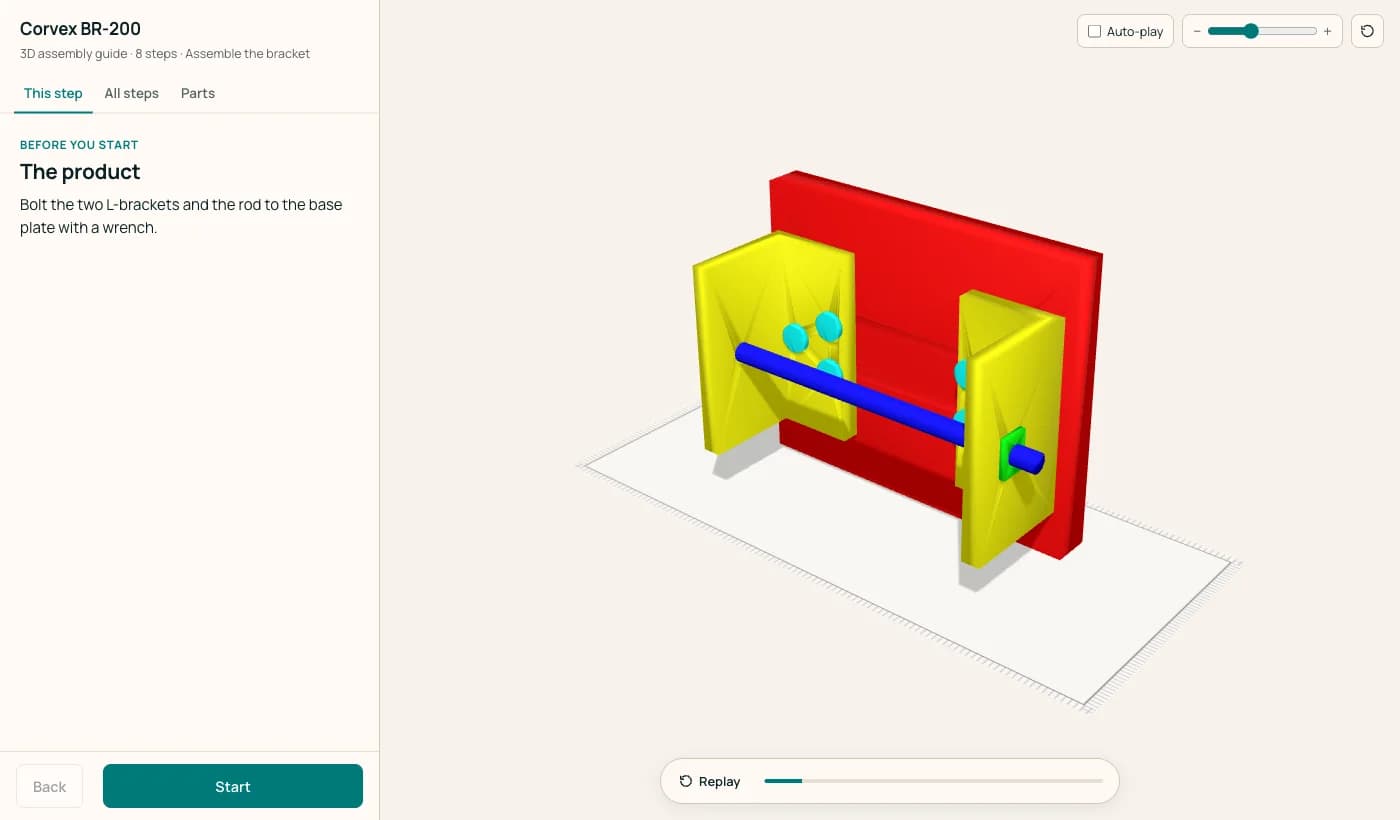
8 steps. Customers turn the model, replay a step and see each part go in.
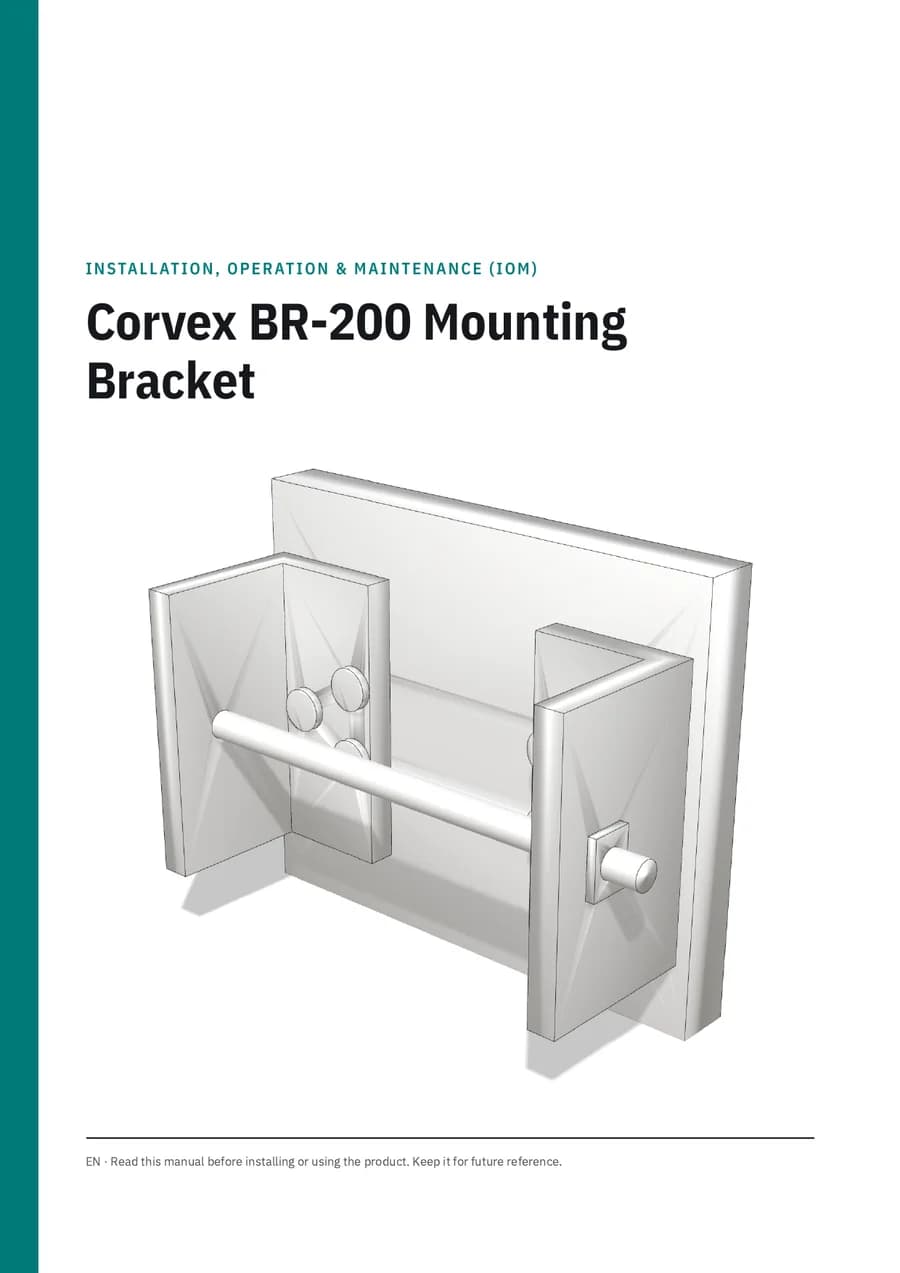
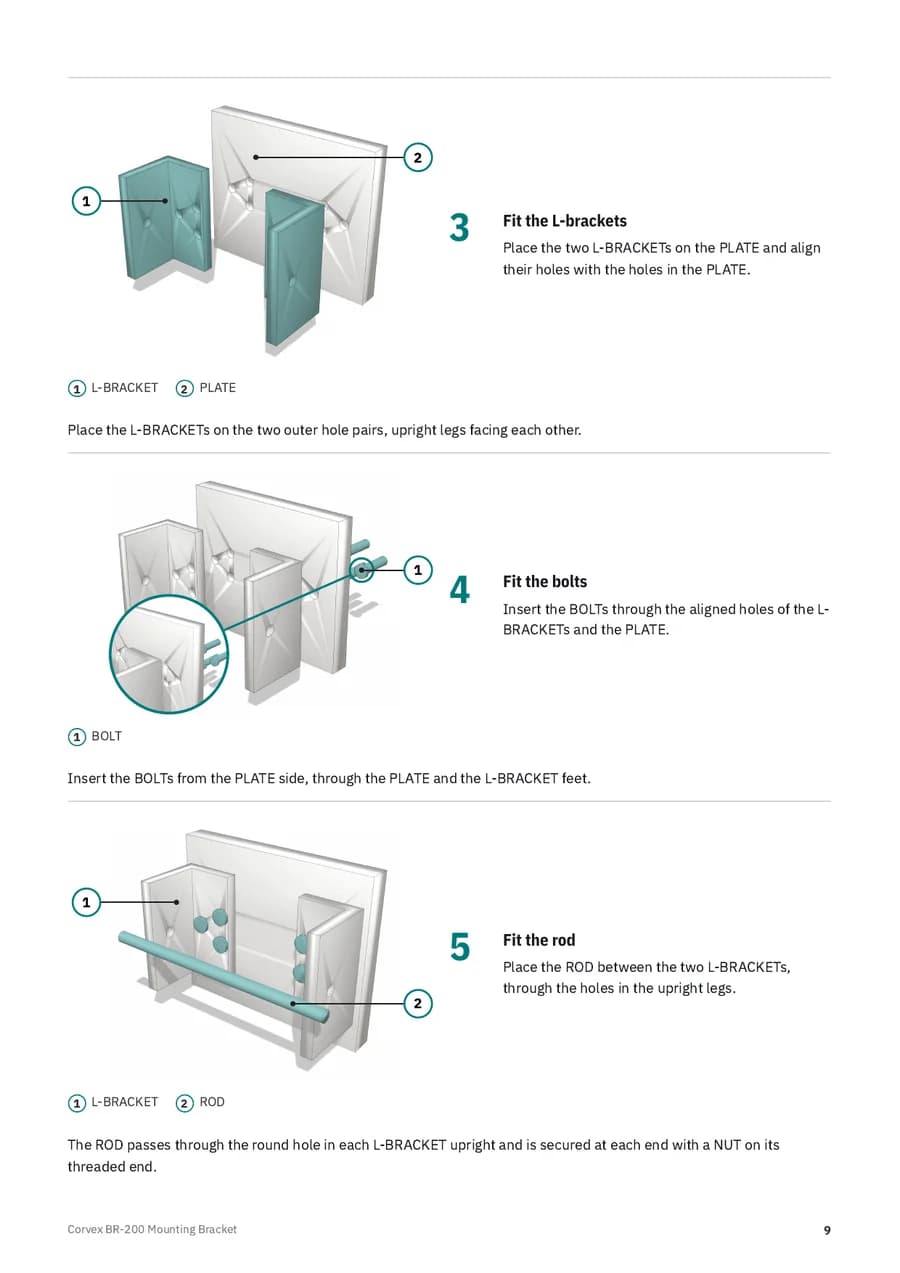
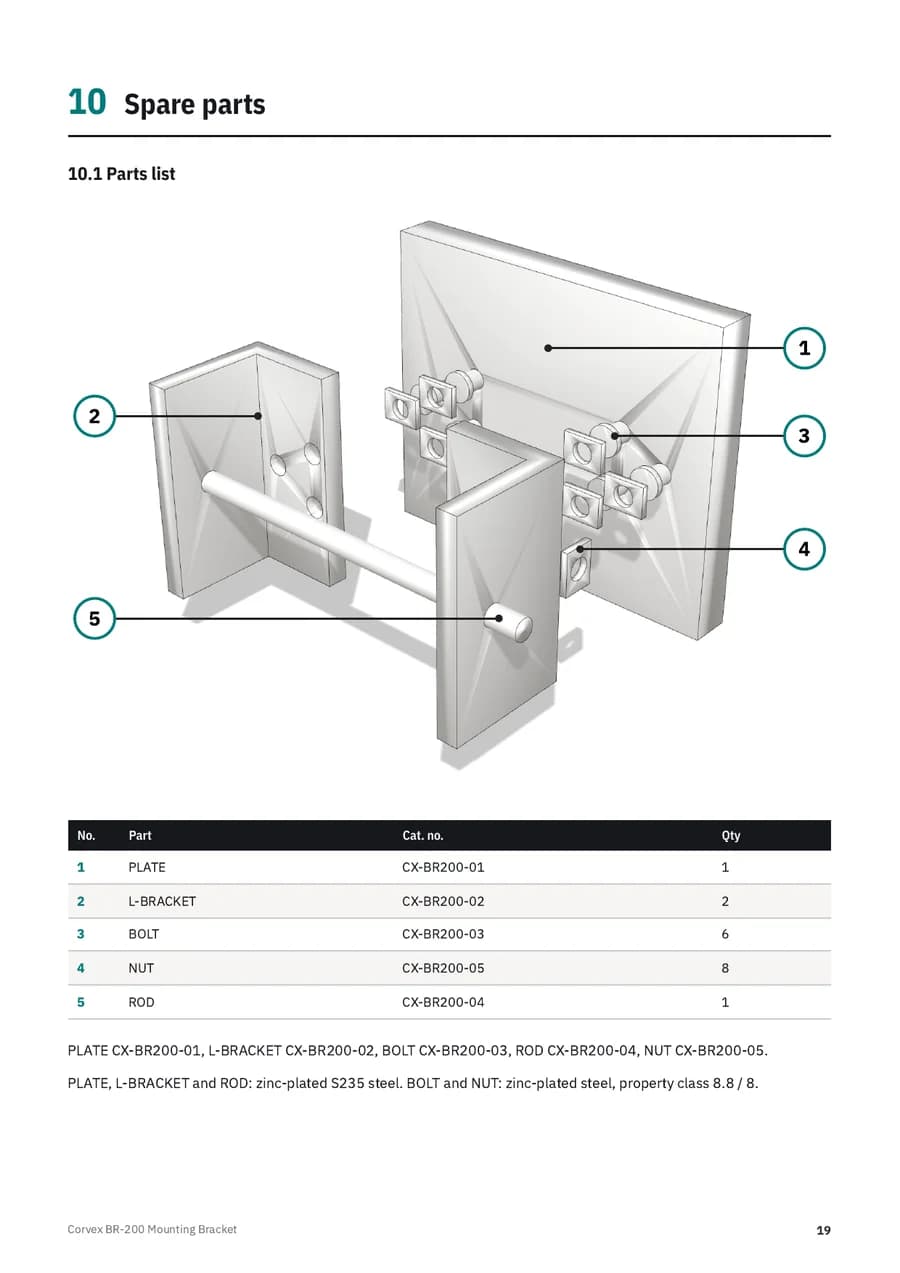
11 chapters: safety, technical data, installation, operation, maintenance, repair, troubleshooting, spare parts and service.
Corvex Industrial is a made-up company. The model is the AS1 test assembly from FreeCAD (LGPL). Facts a 3D file can't hold, like ratings, torque and contact details, were filled in by hand, the way you would.
The model is the truth. The manual should follow it.
Drawn from the model, not by hand
Every figure is rendered from your CAD geometry, so the pictures match the product.
A changed part is a redrawn page
Re-import the revised file and the figures follow. No illustrator round trip.
The chapters reviewers ask for
Safety notices, specifications, maintenance intervals and spare parts are part of the plan from the start.
Every market, one source
Translate the whole manual into 80+ languages. Figures and layout carry over, and each part keeps one name.
Only have a PDF manual? Turn it into a 3D assembly video · See more examples of what Vidocu makes
See the manual your 3D file already holds
Send one 3D file and a line about the product. We email you a sample IOM and an interactive 3D guide, in the language you pick on the form. Free.
Questions about CAD to manual
Can Vidocu turn a CAD file into a manual?
Yes. Upload a STEP, IGES, STL, glTF or other 3D file. Vidocu reads the parts and how they fit, plans the chapters, and writes an IOM manual with figures drawn from the model. It also builds an interactive 3D guide of the assembly or installation.
How do I turn a STEP file into an IOM?
Send the STEP file with the form on this page, plus a line about what the product is. A person on our team checks the model, Vidocu writes the IOM, and we email you the result within 1 business day.
Which 3D file formats do you take?
STEP/STP, IGES/IGS and BREP from CAD, and STL, 3MF, OBJ, PLY, glTF/GLB, FBX, 3DS, Collada (DAE) and VRML (WRL) meshes. Files up to 300MB, or paste a Dropbox, Google Drive or OneDrive link for bigger ones.
Can I upload a SolidWorks, Inventor or Creo file?
Not directly. Export the assembly as STEP (File → Save As or Export → .step) and send that. STEP keeps every part separate, which is what the manual needs.
What goes into the IOM?
Safety information, a product description, specifications, installation, operation, maintenance, troubleshooting and spare parts. Figures are line art from your model with numbered part balloons.
Do I need an existing manual?
No. The 3D file and a short description are enough. If you have an old manual or written steps, add it: it helps with safety notes, maintenance intervals and anything the model can't show.
Can I get the manual in other languages?
Yes. Vidocu writes the IOM in the language you choose, then translates the whole manual into any of 80+ languages, with the figures and layout kept. Each part keeps one name throughout every translation. The video gets subtitles and voiceover in the same languages.
Can it make a video too?
Yes. The same steps can become a narrated assembly video with motion, captions and voiceover. The free result is the IOM and the interactive guide; book a demo to see the video.
What happens to my file?
It is used only to build your result. We review every submission by hand, and you can ask us to delete the file at any time.
Your engineers already built it in 3D. Let the manual come from there.
In your customers' languages, from the first page.
Your knowledge is valuable. Make it usable.
Upload once. Use everywhere.
The AI Knowledge Platform. One upload becomes videos, SOPs, guides, articles, and training - in any language.
© 2026 Vidocu. All rights reserved.