
Vidocu could already do everything to a product video. Write the script, generate the voiceover in 54 languages, place the zooms, burn in the captions, spin out the help article, translate the whole thing. All of it needed one thing from you first: the recording.
That was the last piece, and as of today it is gone.
The AI Recorder is out of private beta and included on every paid plan. You describe a workflow in plain language. An AI agent opens a real browser, signs in, performs the steps itself, and records itself doing them. Then the rest of Vidocu picks the footage up and finishes the job.
One sentence in. A studio-grade product video out: narrated, captioned, zoomed on every click. Nobody touches a mouse.
That is a different thing from what the category calls an AI screen recorder today. Every other tool with that label still makes you do the clicking, and applies AI afterwards: trimming the filler words, adding captions, guessing where to zoom. This one produces the recording in the first place.
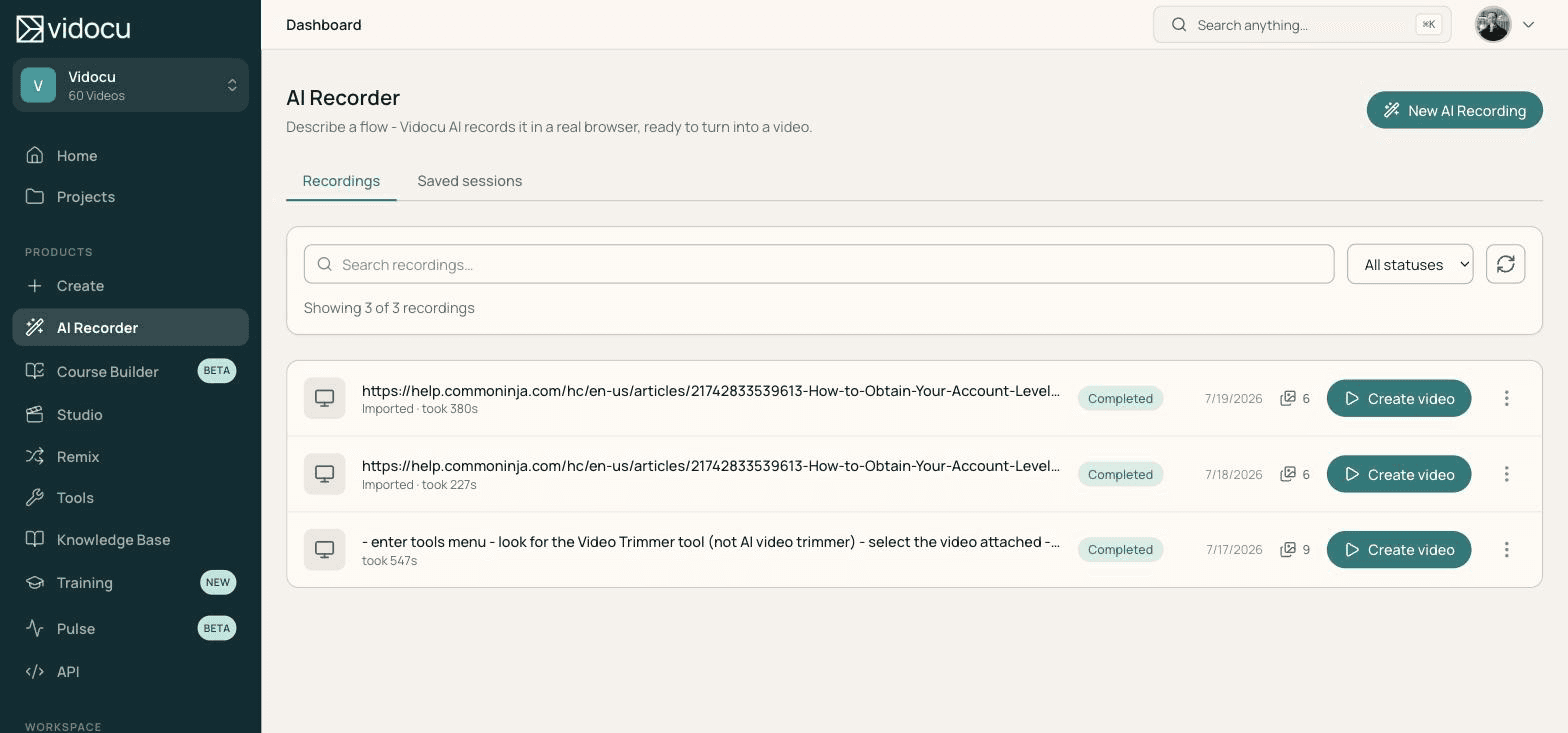
You write the brief, not the recording
A recording starts with a text box. You give it a start URL and describe the flow the way you would brief a new teammate: "Open the Coupons tab, click New coupon, set 20% off, save, and end on the coupons list."
Three optional fields do the heavy lifting. Article URL points the agent at an existing help article and it follows that article step by step, which turns a stale doc into a video without anyone rewriting the doc first. Setup steps cover preparation the video should not show, done off camera and cut from the finished recording. Attachments are files the flow needs to upload partway through.
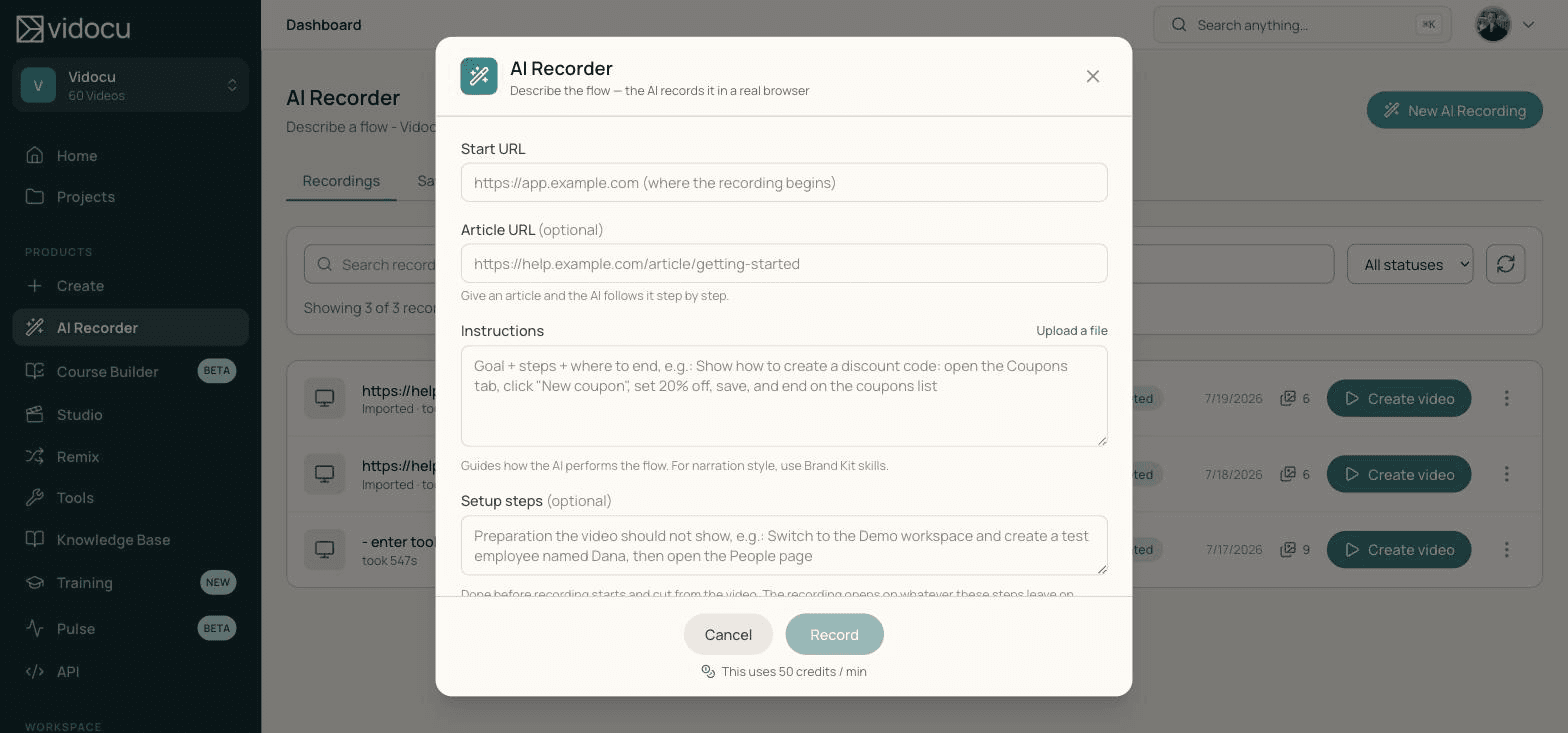
Writing that brief takes about two minutes. It is the only part of the process that needs a human.
It records behind your login
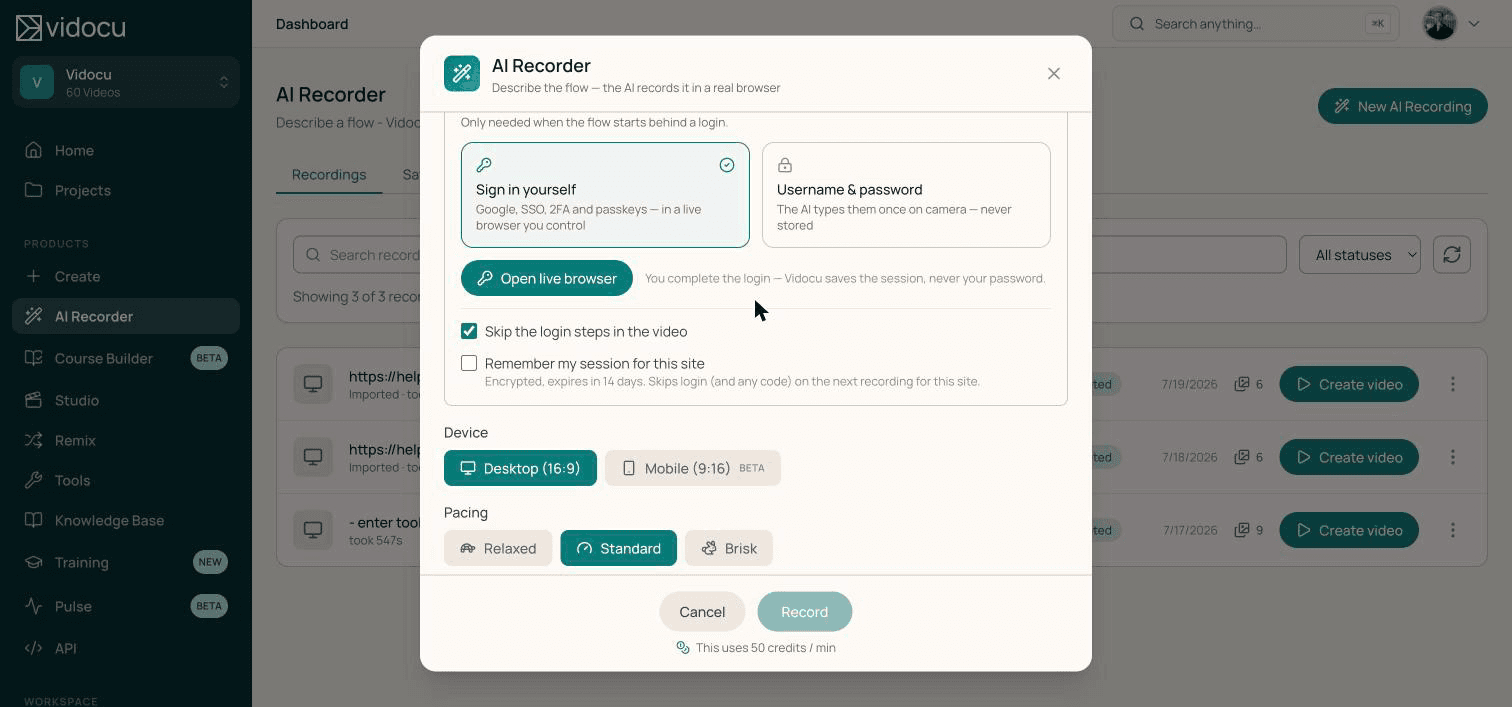
Almost every workflow worth documenting sits behind a sign-in screen, which is where most automation gives up. There are two ways in, and you pick per recording.
Sign in yourself. Vidocu opens a live browser you control, you complete the login however your company actually does it (Google, SSO, 2FA, passkeys), and the agent takes over from there. Vidocu stores the session, never your password.
Username and password. The agent types them once, on camera, and they are not stored. If the login sends a one-time passcode, the run pauses and emails you for the code, then carries on recording.
Either way you can skip the login steps in the finished video, and remember the session to skip the whole dance on the next run.
Record the flow you cannot hand to an intern
The agent signs in, performs the workflow, and hands back video, screenshots, and the written guide from one brief.
See the AI RecorderThe zooms land on the right control, because the agent clicked it
Every other tool that adds automatic zoom-ins and callouts works backwards from footage. It watches the cursor, or diffs pixels between frames, and guesses which element mattered. It is guessing because it was not there when the click happened.
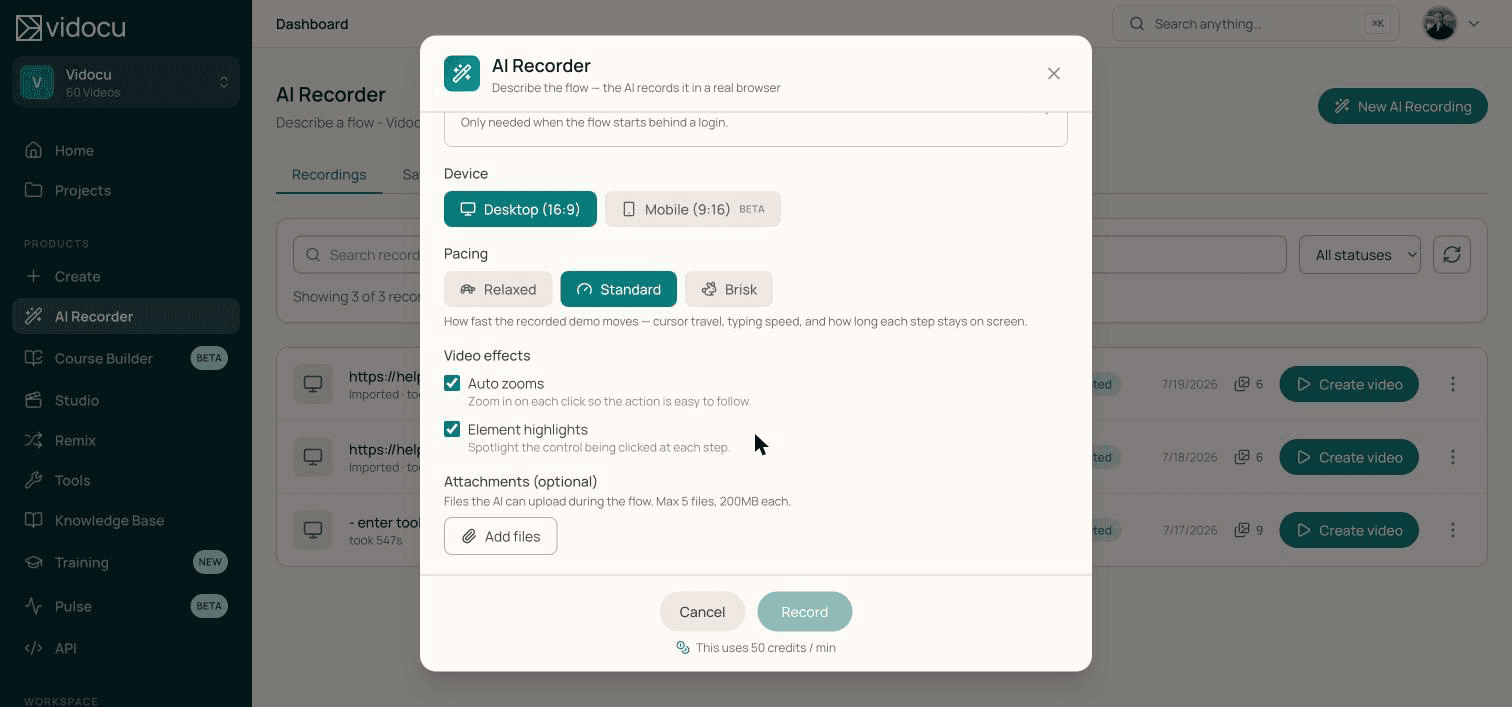
Vidocu's agent was there. It performed each click, so it knows exactly which element it hit and at what instant. Zooms and click spotlights are placed from that record, not inferred afterwards. That is the difference between a zoom that centres on the Save button and a zoom that drifts somewhere near it.
Pacing is a choice too, relaxed through brisk, controlling cursor travel, typing speed, and how long each step holds on screen. Recording the mobile viewport instead of desktop is a single toggle.
Everything after the recording was already automatic
This is why the release matters more than a new feature usually does.
The recording was never the interesting part of making a product video. It was just the part only a human could do, so it gated everything else. Vidocu had already automated everything downstream of it, waiting for someone to hit record.
Now the agent hits record, and the chain runs end to end:
| Stage | Who does it now |
|---|---|
| Perform the workflow and record it | The agent |
| Zoom and spotlight each click | Placed from the click record |
| Write the narration script | Vidocu, from what happened on screen |
| Voice it | AI voiceover, 54 languages |
| Caption it | Generated, styled, ready to burn in |
| Screenshot every step | Comes out of the same run |
| Write the help article | Comes out of the same run |
| Translate the finished video | One click, same pipeline |
You make three choices along the way: which voice, which language, and whether you want the video, the article, the quiz, or all three. Everything else runs.
Nothing is a dead end either. The recording opens in Vidocu Studio with its zooms and highlights already in place, and the article is the same step-by-step guide with screenshots you would otherwise have written by hand. If SOPs are your output, it feeds straight into the video-to-SOP workflow.
What the beta told us
The recorder ran in private beta through July and August with a selected group of customers, and it earned its way out. Not on a demo site either: HR platforms, ERP and manufacturing systems, help centers, and our own product. Real logins, real data, real flows people needed documented that week. Between them those runs captured hundreds of documented steps, each one a screenshot and a line in a guide nobody had to write.
A typical run takes about three minutes from the brief to a finished video.
Three minutes is the machine's time, not yours. Nobody sits and watches. You write the brief, close the tab, and the video is in the workspace when you come back.
The time math
The three minutes is not the interesting number. The interesting number is what those three minutes replace.
| Step | Recording it yourself | AI Recorder |
|---|---|---|
| Script it and stage the data | 15 to 35 minutes | Part of the two-minute brief |
| Record, fluff a step, record again | 15 to 30 minutes | Unattended |
| Trim, zoom, highlight each click | 20 to 40 minutes | Applied from the click record |
| Narrate and caption it | 25 to 50 minutes | Written, voiced, captioned |
| Screenshot the steps, write the article | 30 to 60 minutes | Comes out of the same run |
| Your attention | most of a day | about two minutes |
The saving is not that the machine is fast. It is that the whole chain is unattended, so it stops competing with everything else on your plate. That changes which videos get made at all: the long tail of flows nobody could justify a day for, the tutorials that go stale every sprint, the one-off walkthrough a single customer asked for.
Re-recording compounds it. When the UI changes you do not rewrite the brief. You hit Record again, or reuse a saved session, and the flow is captured against the new interface.
Every paid plan, starting today
Pro, Business, and Enterprise all include the AI Recorder. Recording is metered in credits, so you pay for finished video and nothing else.
See plansWhat "included on every paid plan" means
- Pro, Business, and Enterprise all have it. It used to be granted workspace by workspace, which meant most paying customers had to ask. That is over. The free plan is the one place it does not reach.
- Recording is metered in credits, at 50 credits per minute of finished video, with a one-minute minimum. Plan allowances are on the pricing page.
- Failed runs are free.
- Two recordings run at once per workspace, so one big batch cannot push everyone else's into next week. Extra runs queue rather than fail.
It is not dashboard-only either. The REST API can start a recording, answer a mid-run prompt for a code, and fetch the finished video, so a recording can be triggered by a deploy or a docs pipeline instead of a person. The MCP server exposes the same thing to AI assistants, so Claude can start a recording and hand you back the result.
FAQ
What is an agentic screen recorder?
It is a screen recorder where an AI agent performs the workflow instead of you. You describe the task, the agent opens a browser, carries out the steps, and records itself doing them. Most tools marketed as an AI screen recorder still need a person to do the clicking, and apply AI only to the finished footage. The agentic screen recorder definition covers the distinction.
Do I need to give it my password?
Not necessarily. You can sign in yourself in a live browser Vidocu opens for you, complete SSO or 2FA the way you normally would, and let the agent take over. Vidocu saves the session, not the password. If you do supply a username and password, they are typed once and not stored, so a repeat run asks again.
How much does a recording cost?
Recording is metered at 50 credits per minute of finished video, with a one-minute minimum. Failed runs are not charged.
What happens if the agent cannot complete the flow?
It stops and tells you why, in plain language, and gives you the partial footage and the screenshots it captured before it stopped. Common reasons are a paywall, a permission the account does not have, or a screen that does not exist in the product.
Can it record mobile?
Yes. Pick the mobile viewport instead of desktop before the run and the agent records a 9:16 mobile experience, with no second setup.
Product video was always a chain of jobs where automating nine of them did not help, because the tenth still needed a person at a keyboard. That one is done. Describe the flow, and the whole chain runs. Try Vidocu for free and see what a two-minute brief gets you.

Written by
Daniel SternlichtDaniel Sternlicht is a tech entrepreneur and product builder focused on creating scalable web products. He is the Founder & CEO of Common Ninja, home to Widgets+, Embeddable, Brackets, and Vidocu - products that help businesses engage users, collect data, and build interactive web experiences across platforms.